The first time I tried to download Instagram Live, it was pure panic; my best session had just ended, and I had no clue how to save a live Instagram stream. The laughter, the questions, the stories… everything was about to vanish into thin air. That moment taught me something; lives aren’t just videos; they’re unrepeatable experiences.
I started experimenting, exploring every method until I found the ones that actually work in 2025. Now, I’m sharing them with you, so the next time your live ends, you’ll be ready to capture every second before it disappears forever.
NOTE THAT, don’t miss out on Hub Downloader Instagram tools for quick and easy Instagram content saving, get your Reels, and stories in just a few clicks.
Why You Should Download Instagram Live?
Sometimes a live isn’t just a broadcast, it’s a memory, a connection, a raw story told in real time. Whether you’re a creator, teacher, or just someone sharing your life, saving that moment matters. Here’s why keeping your lives is more than just archiving content, it’s a real Instagram live memory backup:
- Preserve special moments: Keep emotional, fun, or educational streams forever.
- Repurpose content: Re-edit and share on YouTube, TikTok, or your website.
- Stay consistent: Build a video library to reuse ideas and grow your brand.
- Avoid data loss: Prevent your lives from disappearing once the replay expires.
What to Know Before You Download Instagram Live?
Before you try to save Instagram live video in 2025, it’s important to understand how Instagram manages live videos. The platform now offers more control and flexibility, but the process still depends on whether the video is yours or someone else’s.
- Your own live: Instagram allows you to download it instantly after the session ends.
- Someone else’s live: You’ll need a third-party downloader or screen recorder.
- Respect privacy: Always get permission before saving someone else’s broadcast.
- Don’t delay: Archived lives can disappear automatically after a few weeks if not saved.
Do not forget that Instagram live videos can be a factor to increase followers and engagement on your Instagram account, so it can be important to know all the tips about how to Grow My Instagram Account Quickly in 2025 for practical strategies to grow your account quickly in 2025.
Practical (4) Methods for Saving Instagram Live
Instagram Lives aren’t just videos; they’re live moments, experiences, and memories that may never be repeated. Whether it’s a training session, a fun stream, or a live from a popular influencer, saving these videos helps you, but how?
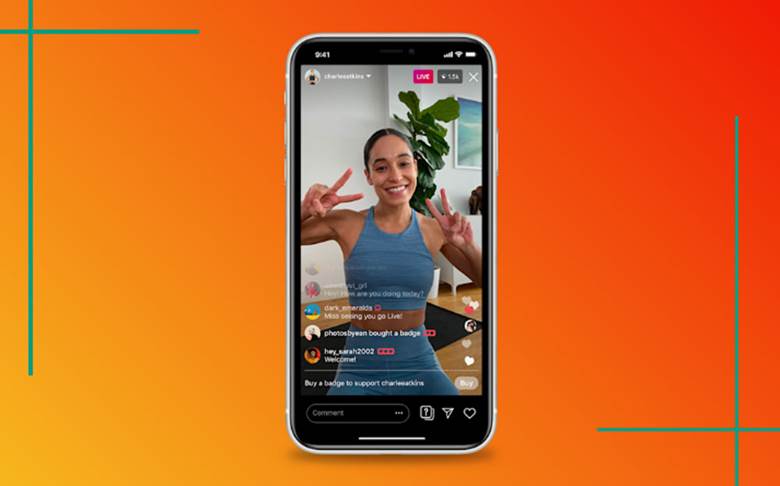
1. Download Your Own Live Instantly
If you’ve just finished an Instagram live broadcast, the quickest and safest way to save it is through Instagram’s built-in feature. It takes only a few taps to keep your video directly on your device for an HD Instagram live download.
Follow these steps:
- When your live ends, tap End in the top-right corner.
- On the summary screen, select Download Video.
- Wait a few seconds for it to save automatically to your gallery.
- You can now edit, post, or store it wherever you like.
- Tip: The saved video includes only the audio and visuals, not the comments, likes, or viewer count.
2. Use the Archive Feature to Save Later
Missed the instant Download? Don’t worry, Instagram’s Archive feature automatically stores your live sessions if enabled. It’s a reliable way to download Instagram live even after it has ended. It’s a reliable way to archive Instagram live even after it has ended.
Here’s how:
- Go to Settings > Privacy > Live Broadcasts.
- Turn on Save live videos to archive.
- Open Menu > Archive > Live Archive.
- Select the live you want and tap Download.
- Note: Live videos remain in your archive for up to 30 days before being permanently deleted, so be sure to save them on time.
3. Download Someone Else’s Live (Public Streams)
Sometimes, the live you want to keep isn’t your own, maybe it’s a concert, a motivational talk, or a favorite influencer’s Instagram live tutorial.
Since Instagram doesn’t provide a built-in feature for this, you’ll need external tools. Thankfully, reliable apps and websites make it easy to download live videos safely.
· Using Trusted Third-Party Tools
One of the most common ways is to download Instagram live videos using third-party tools from public profiles. They’re fast, easy to use, and don’t require you to log into your account. Recommended tools:
- SnapDownloader
- Instacrux
- SocialTradia Downloader
- RedSocial Downloader
How to use them:
- Copy the link of the live replay or post.
- Open one of the downloader tools above.
- Paste the link into the input box.
- Choose your preferred format (MP4) and quality (720p or 1080p).
- Click Download and save the video.
Read more: In addition to our tool to get the desired Reel, you can have a look at How to Download Instagram Reels to Camera Roll for quick and easy ways.
· Screen Recording (For Private Instagram Live Download or Expired Lives)
If the live isn’t public or the replay has expired, Instagram live screen recording is your best backup plan. It lets you capture the session in real time without needing a download link.
For Android:
- Swipe down your quick settings and tap Screen Recorder.
- Play the live video and start recording.
- Stop when finished, the file saves automatically in your gallery.
For iPhone:
- Go to Settings > Control Center > Add “Screen Recording.”
- Swipe down from the top-right corner and tap the Record icon.
- Play the live and stop when done.
- Tip: Use video editors like CapCut, InShot, or Filmora to trim unwanted parts or adjust sound and lighting afterward.
4. Download Instagram Live Using a Computer or Browser Extension
If you prefer working on a desktop, PC tools and browser extensions offer even more control and quality. They’re perfect for creators who want to archive, edit, or back up their videos in HD. Best Instagram live desktop download tools:
- 4K Stogram: Download lives, posts, and stories in bulk.
- Inflact Downloader: Web-based downloader for lives, reels, and stories.
- SaveFrom.net: Quick browser-based option for replay links.
Steps to use:
- Copy the link of the Instagram live replay.
- Paste it into the downloader’s search bar.
- Select your desired format and resolution.
- Save it to your preferred folder.
- Pro Tip: Always use trusted sites, avoid entering login credentials, and keep antivirus software active for security.
In the End, if you are curious to know all the big changes on Instagram in 2025? Be careful in What Are New Features on Instagram in 2025 to find out what’s coming.
Final Thoughts
By now, you know exactly how to keep your best live moments from vanishing. Whether it’s your own stream or someone else’s replay, learning how to download Instagram live and record Instagram live gives you control over your memories and creativity. The trick is simple: act fast, use trusted Instagram live recording tools, and never overlook privacy.
Let’s have a chat! Have you ever regretted not saving a live you truly loved? Share what happened! Which of these methods would you trust the most for your next live session? Drop a comment and let others know which tool worked best for you! Share this Instagram live download guide with your followers; someone out there needs it tonight.
Can I download any Instagram live, even from private accounts?
No, direct downloads from private accounts aren’t possible unless the account owner permits it. In such cases, the safest option is screen recording with consent.
How good is the video quality after downloading?
Using official Instagram options or trusted tools usually gives HD quality. Screen recording may result in slightly lower resolution.
Will comments and likes appear in the downloaded video?
No, only the video and audio are saved. Interactions like comments and likes are not included in the file.
How long after the live ends do I have to download it?
For your own live, the download option appears immediately, and archived videos remain for up to 30 days. It’s best to download quickly to avoid losing them.
Are third-party download tools safe to use?
Yes, if you stick to reputable apps and websites. Avoid entering your Instagram login credentials and always choose trusted tools.